
Why a Trail Pace Predictor Needs More Than Distance
Multi-variable friction models outperform linear distance equations because trail time is a function of load, surface, and grade — not mileage in isolation. Two routes of identical length can differ by hours depending on what’s underfoot and what’s strapped to your shoulders.
Distance Alone Ignores Elevation and Surface
Grade percentage changes metabolic demand non-linearly. A 5% grade adds moderate cardiovascular strain; past roughly 15%, muscle recruitment shifts from a walking gait to a stepping-and-pulling pattern that burns disproportionately more energy per horizontal foot covered. A flat-rate estimate that ignores grade under-predicts time on steep approach trails by 30% or more.
Pack Weight Changes Biomechanical Efficiency
Every added pound shifts center of mass and increases joint torque at the hip and knee with each stride. Past roughly 20% of bodyweight, climbing speed drops sharply as aerobic capacity gets reallocated toward stabilization instead of forward propulsion. Descents carry a separate penalty: the quadriceps work eccentrically to brake a heavier load, and that eccentric strain — not aerobic limitation — is usually what forces hikers to slow down on the way back to the trailhead. This is the backpack weight pace penalty the predictor solves for directly.
The Velocity Delta Between Elite Runners and Beginners
A trained trail runner and a casual weekend hiker can cover the same route at wildly different sustainable speeds, sometimes a 2–3x spread. A static formula built around one “average” pace is functionally useless at either end of that range — which is why a scalable baseline pace input (Leisurely, Steady, Brisk, or Custom) is a required variable, not an optional one.
The Mathematical Variables Driving This Predictor
Every estimate below runs through four layered variables on top of the Naismith baseline. Each layer adjusts the result — none of them replaces the underlying formula.
| Variable Layer | Technical Metric Used | Real-World Impact on Velocity |
|---|---|---|
| Base Walking Pace | Leisurely 1.5 mph / Steady 2.5 mph / Brisk 3.5 mph / Custom | Sets the flat-ground floor before any penalty is applied |
| Vertical Ascent Rate | Naismith climb ratio, scaled up to 15,000 ft (5,000 m) gain | Adds time linearly per elevation band; dominates total ETA on climb-heavy routes |
| Pack Weight Friction | Continuous penalty curve, 0–50 lbs (0–25 kg) | Reduces climbing speed and inflates eccentric descent load as weight rises |
| Terrain – Smooth Trail | Baseline coefficient, 0% overhead | No adjustment to base pace |
| Terrain – Rocky / Uneven | Added friction overhead | Slows footfall cadence and raises energy cost per stride |
| Terrain – Muddy / Slippery | Highest friction overhead | Cuts effective push-off force, extending both climb and flat-time segments |
Real-World Trail Calculation Benchmarks
The three profiles below run the same formula against different real-world conditions. Match your trip against the closest one to sanity-check what the calculator returns.
Scenario A: The Single-Day Peak Push
Inputs: 11.0 km distance, 1,000 m elevation gain, smooth trail, minimal pack (~5.5 kg) Logic: Base walk time at a Steady 4.0 km/h pace runs 2.75 hours. Climb time on 1,000 m of gain adds roughly 2 hours. Smooth terrain applies zero penalty, and a near-empty pack adds negligible overhead. Result: ≈4 hours 42 minutes — badge: MODERATE GRIND, trending toward HARDCORE given the gain-to-distance ratio.
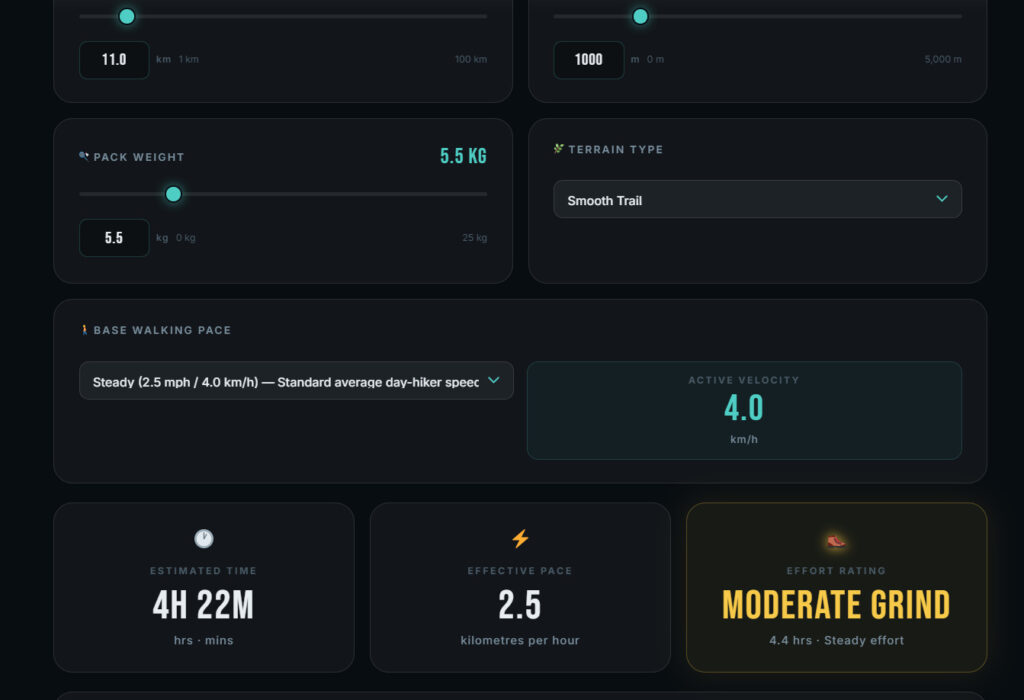
Scenario B: The Heavy-Load Weekend Backpacking Itinerary
Inputs: 25.5 miles, 3,000 ft gain, rocky/uneven terrain, 35 lb pack Logic: Base walk time at Steady pace (2.5 mph) runs 10.2 hours. Climb time adds 1.5 hours. Rocky terrain adds roughly 15% overhead on base walk time. A 35 lb pack — 70% of the tool’s max input — adds a further 20% penalty across walk and climb time combined. Result: ≈15.5 hours total — badge: HARDCORE – Elite Endurance for a single push, or split across two trail days (~7.5 hours each) for a realistic backpacking time calculator itinerary.
Scenario C: The Technical Trail Running / Ultra Strategy
Inputs: ~32-mile route, 6,500 ft cumulative gain, variable rocky singletrack, Custom pace input at 5.8 mph flat-ground equivalent Logic: Runners front-load speed on flat and rolling terrain, but technical descent segments get a distinct penalty — steep, loose downhill sections extend time by 20–30% versus a flat-pace projection, since braking force replaces propulsive force. Result: Pacing strategy shifts from “fastest average speed” to “protect the legs on descent,” which is the core reason ultra-distance runners underperform naive per-mile projections.
Factors That Intentionally Degrade Prediction Accuracy
No trail ETA calculator — this one included — fully models three conditions: altitude physiology, extreme descent gradients, and unstable ground. Treat outputs in these categories as directional guidance, not exact numbers.
Extreme High-Altitude Hypoxia
- Above roughly 10,000 ft, blood oxygen saturation (SpO2) begins measurable decline in unacclimatized hikers
- Aerobic output drops even at identical heart rate, meaning the same effort produces less forward speed
- Neither distance nor gain accounts for this — it’s a physiological ceiling the tool can’t observe directly
Extreme Downhill Gradients
- Steep descents switch working muscles into eccentric contraction, effectively “braking” body weight with every step
- This slows travel speed despite elevation dropping, the opposite of what a linear pace model would predict
- Grades beyond roughly 20% down often move slower than the equivalent uphill segment
Severe Environmental Disruption
- Snowfields and scree fields cut effective stride length and push-off force
- Active mud adds direct resistance and increases fall risk, both of which force deliberate pace reduction
- Whiteout or low-visibility navigation adds route-finding time no distance formula can capture
How to Generate the Most Accurate Route Estimates
- Split multi-day routes into single-day segments. Running an entire loop through one calculation loop hides where fatigue and elevation actually concentrate — calculate day by day instead.
- Enter Custom pace once you know your number. Leisurely, Steady, and Brisk are useful defaults, but a GPS-logged average from a prior hike on similar terrain produces a tighter estimate.
- Round elevation gain up, not down. Trail-app elevation data frequently undercounts small rollers; a conservative gain figure protects against underestimating total climb time.
- Re-run the calculation per terrain change. A route that shifts from smooth trail to rocky/uneven halfway through should be split at that boundary rather than averaged across the whole distance.
Frequently Asked Questions
How accurate is Naismith’s Rule?
On its own, Naismith’s Rule is accurate mainly for fit hikers on dry, even terrain with light gear. Outside those conditions, it consistently underestimates time on steep, technical, or multi-day routes, which is why modern trail pace predictors layer terrain and load corrections on top of it rather than replacing it outright.
Does pack weight really slow hiking speed?
Yes — measurably, and non-linearly past roughly 20% of bodyweight. Heavier loads increase joint torque on climbs and eccentric quadriceps strain on descents, both of which reduce sustainable pace independent of fitness level.
Should I calculate my route using miles or kilometers?
Either works identically, since the underlying formula converts internally. Use whichever unit matches your map source or GPS device to avoid manual conversion errors when entering distance and elevation gain.
Is this tool better optimized for hiking or trail running?
It handles both, but trail running requires a Custom pace input rather than a preset dropdown. Runners should account for the added descent-gradient penalty separately, since braking-dominant downhill segments behave differently than a flat per-mile running pace.
How do I calculate times for a multi-day hike?
Split the route into single-day segments and calculate each one separately. Cumulative fatigue across multiple days isn’t something a single-pass formula captures well, so day-by-day segmentation produces a more realistic total itinerary time.
Why is my calculated result different from my GPS watch?
GPS watches log actual performance, including rest stops, navigation pauses, and real-time terrain reactions the calculator can’t observe in advance. Treat the tool’s output as a planning estimate and your GPS watch data as the ground-truth benchmark to refine future Custom pace inputs.

Ethan Marlowe is an experienced hiker and outdoor gear specialist based in Colorado. With over 7 years of hands-on experience trekking through the Rockies, Pacific Northwest, and East Coast trails, he delivers practical advice, expert gear reviews, and survival insights. His goal is to help hikers of all levels make smarter decisions on and off the trail.